Syntax Trees for Enterprise Code
Any enterprise application would have multiple repositories, and each repository would contain lines of code that may not be easy to understand when examined individually.
There was a time when I used to Unit Test the module to understand the logic. Now, it’s not possible.
Is there a way to understand the code and dependencies within the code and across repositories?
That’s the question I have decided to answer.
For this question, I will be working on an ASP.NET code. The toy example is the simplest code I could write.
To understand the dependencies, we need to determine if it is possible to create an Abstract Syntax Tree for the code. The answer is a resounding yes. Microsoft has open-sourced its .NET compiler called Roslyn.
The document mentions SYNTAX, which is fundamental to Roslyn. Roslyn generates a SyntaxTree. One can extract Methods, Variables, etc. from the SyntaxTree.
I am using the Microsoft package CodeAnalysis. The details about SyntaxTree can be found here
The code to generate the syntax tree is here
Steps to generate a syntax tree
- The program receives a path to a
repo(local path). It walks through the entire path looking for any file ending in extension*.cs. - Obviously, I had to create a data structure that holds the entire Syntax tree detail for the given repo.
...
public class ClassDetail
{
 public required string ClassName {get; set;}
 public required string FilePath {get; set;}
 public required string SourceCode {get; set;}
 ...
}
Refer to file DataStructure.cs
-
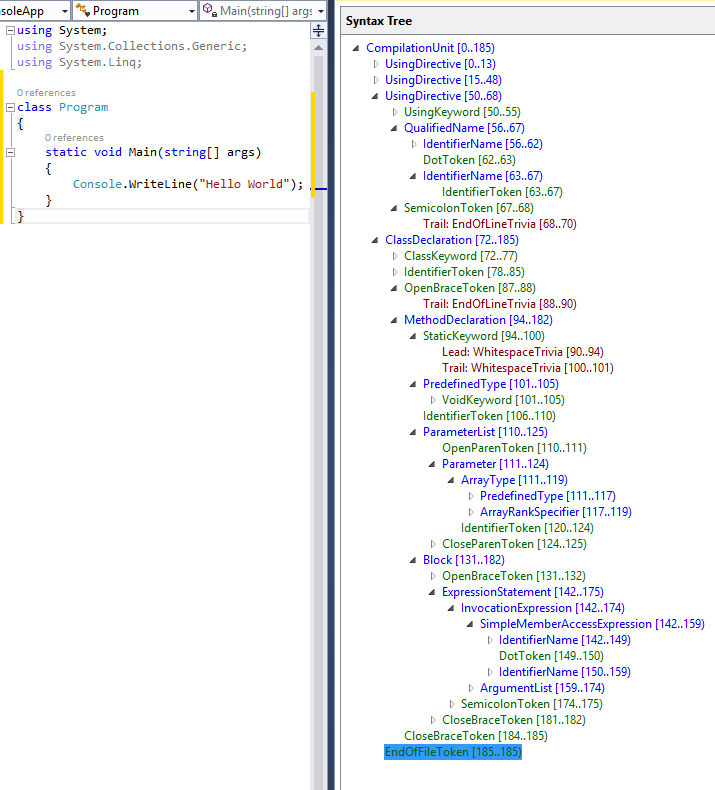
[Optional] If working on Visual Studio, one can download the plugin
Syntax Visualiserto help view the tree. Since I wrote this on Mac, I used a debugger to view theSyntax Tree.Refer to Microsoft Docs for more details. -
In my case, I am more interested in Classes, Methods, local variables, and using statements. The relevant types included ClassDeclarationSyntax, MethodDeclarationSyntax, and others.
-
Let’s say the WalkRepo function has identified a file called
AddItem.cs. To determine all the class declarations, use the syntax -
var code = File.ReadAllText(file);
var syntaxTree = CSharpSyntaxTree.ParseText(code);
var root = syntaxTree.GetRoot();
foreach (var classDecl in root.DecendantNodes().OfType<ClassDeclarationSyntax>().ToList())
{
 var className = classDecl.Identifier.Text;
 ....
}
- The idea is simple: if I want to get all the methods defined for
ClassDeclarationSyntax classDecl,use the below command
var methods = classDecl.DescendantNodes().OfType<MethodDeclarationSyntax>().ToList();
- For each Syntax Type, Microsoft has provided the available properties in its document. The second option is to refer to Syntax Visualiser. If both fail, try GPT, Claude, etc.
Based on the requirements, one can generate a SyntaxTree according to the expected data model. In my case, the following is a sneak peek into the syntax tree.
 "ClassName": "ItemController",
 "FilePath": "C:\\Users\\tusharsaurabh\\Documents\\syntax_analyzer\\AddItems\\Controller\\ItemController.cs",
 "SourceCode": "[ApiController]\r\n    [Route(\u0022api/[controller]\u0022)]\r\n    public class ItemController : ControllerBase\r\n    {\r\n        private readonly InsertItem _insertItem;\r\n\r\n        public ItemController()\r\n        {\r\n            _insertItem = new InsertItem(\u0022Data Source=mydatabase.db\u0022);\r\n        }\r\n\r\n        [HttpPost(\u0022add_item\u0022)]\r\n        public IActionResult AddItem([FromBody] ItemModel item)\r\n        {\r\n            try\r\n            {\r\n                bool isInserted = _insertItem.Insert(item);\r\n                if (isInserted)\r\n                {\r\n                    return Ok(new { message = \u0022item Added Successfully\u0022, item });\r\n                }\r\n                else\r\n                {\r\n                    return BadRequest(new { message = \u0022Failed to add item\u0022 });\r\n                }\r\n            }\r\n            catch (Exception ex)\r\n            {\r\n                return BadRequest(new { message = \u0022Error Occured\u0022, error = ex.Message });\r\n            }\r\n        }\r\n    }",
 "Properties": null,
 "Methods": [
 {
 "MethodName": "AddItem",
 "SourceCode": "[HttpPost(\u0022add_item\u0022)]\r\n        public IActionResult AddItem([FromBody] ItemModel item)\r\n        {\r\n            try\r\n            {\r\n                bool isInserted = _insertItem.Insert(item);\r\n                if (isInserted)\r\n                {\r\n                    return Ok(new { message = \u0022item Added Successfully\u0022, item });\r\n                }\r\n                else\r\n                {\r\n                    return BadRequest(new { message = \u0022Failed to add item\u0022 });\r\n                }\r\n            }\r\n            catch (Exception ex)\r\n            {\r\n                return BadRequest(new { message = \u0022Error Occured\u0022, error = ex.Message });\r\n            }\r\n        }",
 "LocalVariables": [
 {
 "VariableType": "bool",
 "VariableName": "bool isInserted = _insertItem.Insert(item)"
 }
 ],
 "Arguments": [
 {
 "VariableType": "ItemModel",
 "VariableName": "item"
 }
 ],
-
I have used minimal heuristics in this code, but heuristics will play a significant part in such endeavors. For example, if a folder
Controllercontains endpoints, retrieve all the methods from the files stored in a folderController -
Microsoft document covers
SemanticModelwhich can be used to get meaning. I will be using it in next article. Furthermore, these dependencies can be stored in any graph database such asNeo4j.CypherQueriescan be used to understand the dependencies. This will be covered in the tird installment of the series.